
Text recruiting best practices come down to personalization, timing, compliance, and respecting the medium. SMS is personal — it arrives on the same screen as messages from friends and family. Candidates who feel like they are receiving a mass blast will disengage. Candidates who feel like a real person reached out to them about a real opportunity will reply.
98% of text messages are opened — but a poorly written recruiting text gets the same result as a great email: silence.
The channel is powerful, but the execution determines the outcome. Recruiting teams that follow text recruiting best practices see 92% of qualified candidates self-schedule interviews within 24 hours (GoHire client data). Teams that wing it see opt-outs, ghosting, and wasted spend.
This guide covers the 12 best practices for text recruiting that top hiring teams follow, SMS recruiting tips for improving response rates, the dos and don’ts, and the mistakes that cost recruiting teams candidates.
12 Text Recruiting Best Practices Every Hiring Team Should Follow
1. Always Get Consent Before Texting
This is not just a best practice — it is the law. The TCPA requires prior express consent for informational recruiting texts and prior express written consent for promotional messages. Every candidate in your SMS pipeline should have an auditable consent event: a keyword opt-in, an application form checkbox, or a career site disclosure. GoHire logs consent automatically with timestamps, phone numbers, and consent type. Skipping this step exposes your organization to $500–$1,500 per text in TCPA penalties.
2. Personalize Every Message
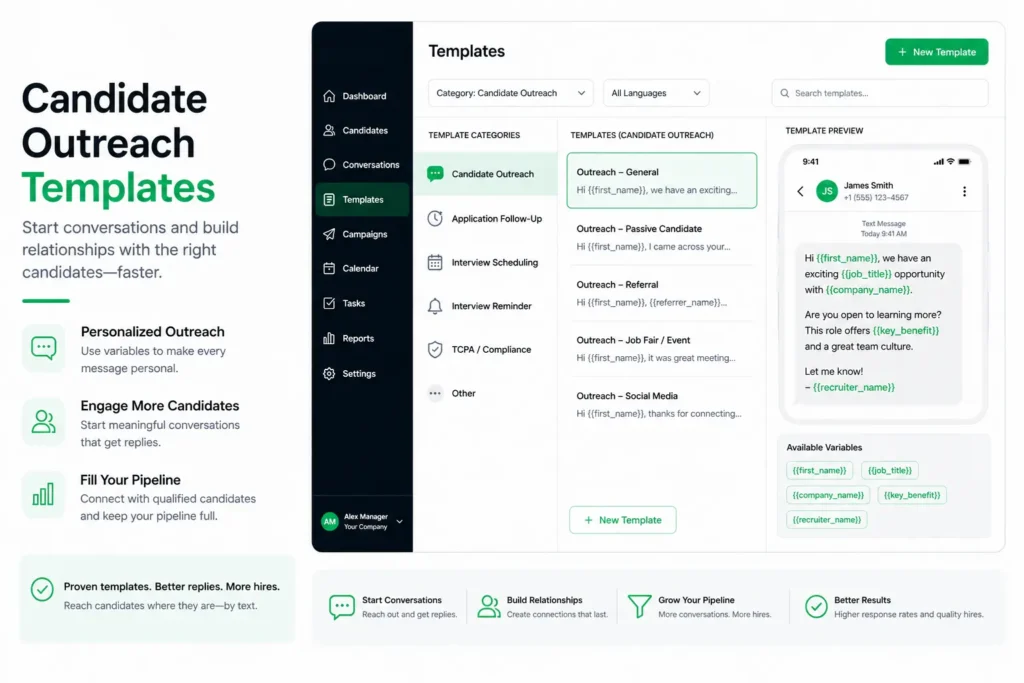
Generic mass texts get ignored or trigger opt-outs. Include the candidate’s first name, the specific role, and the company name. GoHire’s merge fields make this automatic. Compare these two messages:
Bad: “We have open positions. Apply now.”
Good: “Hi [first_name], [Company] has an open [Role] position near [Location]. Interested? Reply YES and I’ll send details.”
3. Keep Messages Under 160 Characters When Possible
Standard SMS messages are 160 characters. Messages that exceed this limit are split into multiple segments, which can arrive out of order or with delays. Short, focused messages with a clear response trigger outperform long paragraphs.
4. Use Response Triggers, Not Links
Instead of asking candidates to leave the SMS thread and visit a URL, ask them to reply with a keyword. “Reply YES to schedule an interview” converts better than any link because the action happens inside the conversation. GoHire’s Text Invite feature is built entirely on this principle.
5. Text During Business Hours
Send recruiting texts between 8 AM and 8 PM in the candidate’s local time zone. Messages sent outside business hours feel intrusive and generate higher opt-out rates. GoHire allows you to schedule messages by time zone.
6. Respond Within Minutes, Not Hours
When a candidate replies, speed matters. Per SHRM, 94% of qualified candidates take the first offer they receive. GoHire’s chatbot handles initial responses instantly — pre-screening questions fire the moment a candidate engages, so there is zero wait time even when recruiters are in meetings.
7. Identify Yourself Immediately
Your first message should include the sender’s name and company. Candidates receive texts from unknown numbers constantly — if they cannot identify who is texting, they will ignore or block the number. “Hi [first_name], this is [Recruiter Name] from [Company]” is the minimum standard for every first-touch message.
8. Include Opt-Out Language in First Messages
Beyond the TCPA requirement, including “Reply STOP to opt out” in your first message actually reduces opt-outs. It signals professionalism and gives candidates confidence that they are in control of the conversation.
9. Limit Message Frequency
Do not send more than two to three messages in a sequence without a candidate response. If a candidate has not replied after three touchpoints, move them to a longer-term nurture cadence (once per week or less) or pause outreach. Over-texting is the fastest way to generate opt-outs.
10. Use Templates, But Customize Them
Start with proven text recruiting templates, then customize for the role, location, and candidate. Templates ensure compliance language and response triggers are consistent. Customization ensures candidates feel like the message was written for them.
11. Track and Measure Everything
Monitor delivery rates, open rates, response rates, opt-out rates, and time-to-response for every campaign. GoHire’s dashboard provides real-time analytics on every metric, so you can A/B test messages and continuously improve.
12. Automate the Follow-Up Sequence
Manual follow-up is where recruiting pipelines break down. GoHire’s text recruiting campaigns automate multi-step sequences: initial outreach, pre-screening, scheduling, confirmation, and reminder — all triggered by candidate responses without recruiter intervention.
GoHire: Text Recruiting Built for Speed
GoHire’s two-way text recruiting platform lets candidates apply by texting a keyword, get pre-screened by an AI chatbot, and self-schedule their interview — all over SMS. No app downloads. No email chains. 98% of texts are read within 3 minutes.
Dos and Don’ts of Text Recruiting
Do: get consent before every first message; use the candidate’s name and the specific role; include your name and company in the first text; use response triggers (“Reply YES”) instead of links; include opt-out instructions; respond to candidate replies within minutes; track metrics and iterate; use a TCPA-compliant, 10DLC-registered platform.
Don’t: send texts from personal cell phones; text candidates before 8 AM or after 8 PM in their time zone; send generic impersonal mass blasts; overwhelm candidates with too many messages; use slang, excessive abbreviations, or unprofessional language; ignore candidate replies or delay follow-up; purchase or scrape phone number lists; continue texting candidates who have opted out.
Text Recruiting Mistakes to Avoid
Mistake 1: Generic Messages That Sound Like Spam. “We’re hiring! Apply now!” tells the candidate nothing. Personalized messages with the candidate’s name, a specific position, and a company identifier dramatically outperform generic blasts.
Mistake 2: No Response When Candidates Reply. A candidate who texts back “YES” expects an immediate next step. GoHire’s chatbot handles initial responses instantly, ensuring zero gap between candidate engagement and next action.
Mistake 3: Texting Without Consent. Beyond the legal risk ($500–$1,500 per TCPA violation), texting candidates who did not opt in damages your employer brand.
Mistake 4: Ignoring Opt-Out Requests. When a candidate replies STOP, the conversation is over permanently. GoHire enforces this automatically with a platform-wide “Do Not Message” database.
Mistake 5: Using Personal Cell Phones. Recruiters texting from personal phones creates a compliance nightmare: no consent logging, no opt-out handling, no 10DLC registration, no audit trail.
Mistake 6: No Follow-Up Strategy. Sending one text and waiting is not a strategy. The most effective programs use automated multi-step sequences: initial outreach, 24-hour follow-up, 48-hour second touch, and a longer-term nurture cadence.
How to Improve Text Recruiting Response Rates
Shorten your messages. Messages under 160 characters consistently outperform longer ones. Cut every unnecessary word and end with a clear response trigger.
Test send times. Tuesday through Thursday during mid-morning (9–11 AM) and early afternoon (1–3 PM) tend to produce the highest engagement for recruiting texts.
A/B test your opening line. The first 40 characters of your text appear on the lock screen notification. Test variations: lead with the role title, lead with the company name, lead with a benefit (“Earn $22/hr”).
Reduce friction in the response. “Reply YES” is easier than “Reply with your full name and availability.” GoHire’s chatbot collects details one question at a time through simple replies.
Follow up faster. GoHire’s automated flows ensure the next step fires within seconds of the candidate’s reply, keeping the conversation alive when engagement is at its peak.
TCPA Compliance: The Foundation of Every Text Recruiting Best Practice
Every text recruiting best practice starts with compliance. GoHire builds it into the platform at every level: consent tracking with timestamps, double opt-in confirmation, 10DLC registration handled during onboarding, automatic STOP handling, and a Do Not Message database that blocks opted-out candidates across your entire account.
See How GoHire Automates Your Hiring
GoHire customers fill roles in 24-48 hours instead of 7-14 days — with zero phone calls and zero emails. 92% of qualified candidates self-schedule their interview within 24 hours.
Frequently Asked Questions
What are the most important text recruiting best practices?
The top three: always get consent before texting, personalize every message with the candidate’s name and the specific role, and respond to candidate replies within minutes. These three practices alone address the most common causes of poor SMS recruiting performance — legal risk, low engagement, and lost candidates.
What are the best SMS recruiting tips for higher response rates?
Keep messages under 160 characters, use response triggers instead of links, send during mid-morning or early afternoon on Tuesday through Thursday, and include the company name in the first message. GoHire clients using these tips see 92% of qualified candidates self-schedule interviews within 24 hours.
What are common text recruiting mistakes to avoid?
The most damaging: texting without consent (creates legal liability), sending generic impersonal messages (drives opt-outs), delayed follow-up when candidates reply (loses engaged candidates), and using personal cell phones instead of a registered platform (creates compliance gaps).
Do text recruiting best practices require a specific platform?
In practice, yes. Following these standards at scale — consent logging, STOP handling, 10DLC registration, merge field personalization, automated sequences, and response-time guarantees — requires a purpose-built text recruiting platform like GoHire. Personal phones and generic messaging tools cannot provide the compliance infrastructure or automation that professional SMS recruiting demands.
What are the dos and don’ts of text recruiting?
Do: personalize messages, get consent, identify yourself, use response triggers, include opt-out language, respond fast, and use a compliant platform. Don’t: text from personal phones, send outside business hours, use generic mass blasts, overwhelm with frequency, use unprofessional language, ignore opt-outs, or purchase phone lists.
