
How to Hire with Text Messaging: The Complete SMS Hiring Guide
94% of qualified candidates take the first offer they receive. That single SHRM statistic explains why the fastest recruiter wins — and why text messaging has become the default hiring channel for high-volume employers. Email sits unread. Phone calls go to voicemail. But 98% of text messages are read within three minutes. When you learn how to hire with text messaging, you’re not just adopting a new tool — you’re eliminating the communication bottleneck that costs you your best candidates.
This text message hiring guide walks you through every stage of the SMS hiring funnel: sourcing, screening, scheduling, interviewing, and making the offer. Each stage includes the exact text messages GoHire clients use to reduce time-to-offer from 7–14 days to 24–48 hours.
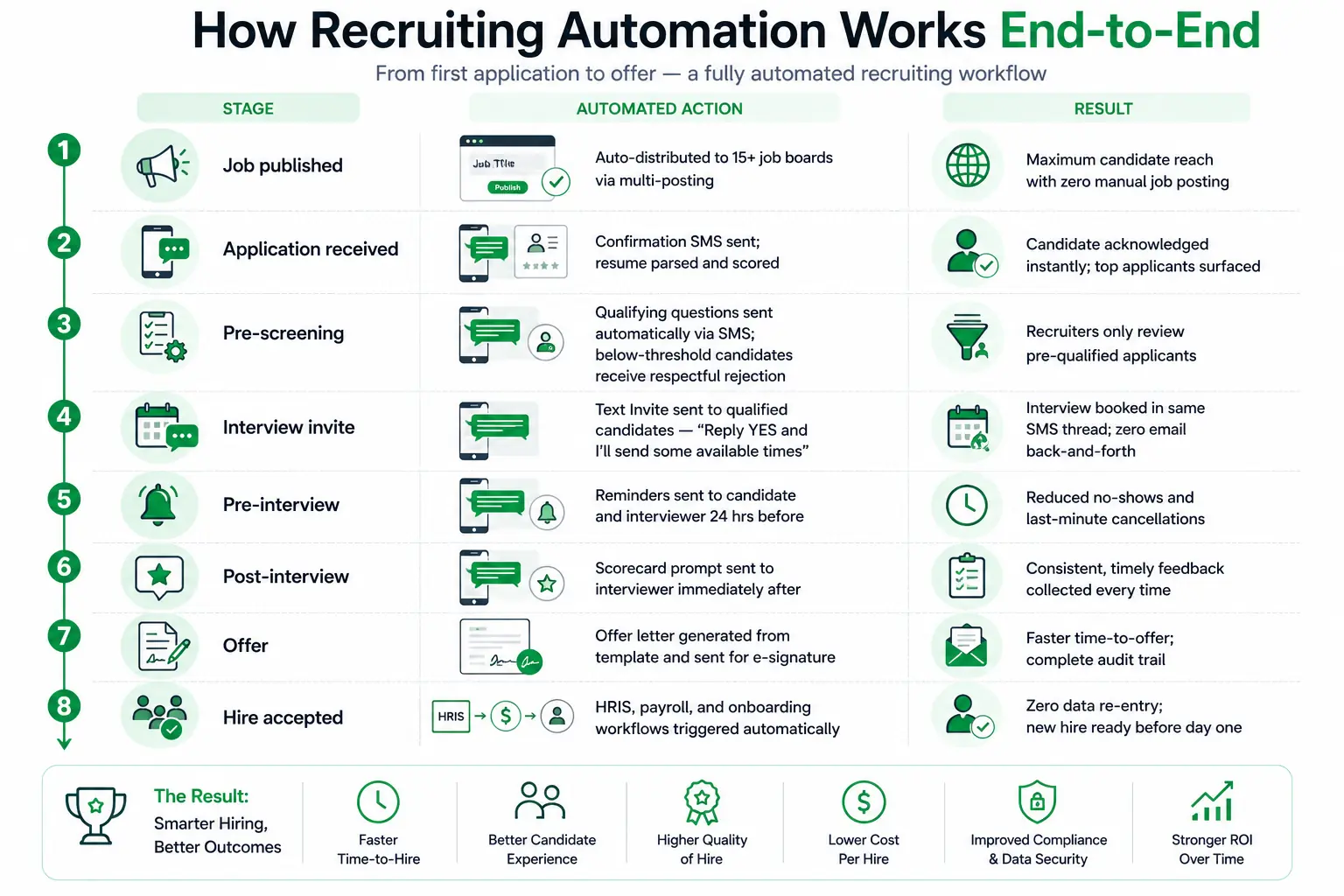
Step 1: Sourcing — Reach Candidates via Text
Inbound: Text-to-Apply. With GoHire’s Apply by Text feature, candidates text a keyword (like “JOBS”) to your company’s number. They receive an instant response with a short application flow completed entirely over SMS. No web forms, no email, no app downloads. The candidate goes from “interested” to “applied” in under 60 seconds.
Outbound: Recruiter Outreach via SMS. For sourced candidates, referrals, and passive talent, outbound text messaging replaces cold emails and InMail.
Outbound Sourcing — Referral Outreach
“Hi {{firstname}}, recruiting here! One of our employees said you would be a great fit! Are you interested in applying to our open position so we can schedule an interview?”
Step 2: Screening — Pre-Qualify Candidates Over SMS
GoHire’s AI recruiting chatbot handles pre-screening automatically. The chatbot asks qualifying questions via text, collects the responses, and scores the candidate against your criteria. Qualified candidates move to scheduling automatically. Unqualified candidates receive a respectful notification.
Application Acknowledgment — Screening Begins
“Hi {{firstname}}, thank you for applying to {{brandname}}! We’ve received your application and our team is reviewing it. We’ll be in touch soon with next steps. In the meantime, feel free to reply here with any questions.”
 GoHire: Text Recruiting Built for Speed
GoHire’s two-way text recruiting platform lets candidates apply by texting a keyword, get pre-screened by an AI chatbot, and self-schedule their interview — all over SMS. No app downloads. No email chains. 98% of texts are read within 3 minutes.
Step 3: Scheduling — Let Candidates Self-Schedule via Text
Video Interview Invite
“Hi {{firstname}}, we’d like to schedule a video interview with you for the role at {{brandname}}. Please pick a time using this link: {{schedulinglink}} We’ll send the video meeting link once confirmed. Reply here if you need anything!”
GoHire’s automated interview scheduling integrates directly with the text messaging flow. When a candidate receives the scheduling text, they tap the link, pick a time, and receive an instant confirmation — all within the SMS thread. The result: 92% of qualified candidates self-schedule within 24 hours.
Step 4: Reminders — Reduce No-Shows with Automated Texts
Day-Before Reminder
“Hi {{firstname}} {{lastname}}, this is a reminder that your interview with {{company}} is tomorrow! Please bring a valid photo ID and arrive 10 minutes early. Our address: {{interview_address}} Reply CONFIRM to let us know you’ll be there, or RESCHEDULE if you need a new time.”
Morning-Of Reminder
“Good morning {{firstname}}! Your interview at {{company}} is today. We’re looking forward to meeting you! Address: {{interview_address}} Time: {{interview_time}} See you soon!”
Step 5: Post-Interview — Close the Loop via Text
Post-Interview Thank You
“Hi {{firstname}}, thank you so much for interviewing with {{company}} today! It was great getting to know you. Our team will be reviewing all candidates and we’ll be in touch within {{timeframe}} with next steps.”
Step 6: Compliance — TCPA and Text Hiring
Prior express written consent: Before sending any recruiting text, you must have documented consent from the candidate. GoHire captures this during the text-to-apply flow or through a dedicated TCPA consent sequence.
Re-Consent / Compliance Reminder
“Hi {{firstname}}, as part of our updated communication policy, we need to confirm your consent to receive text messages from {{brandname}}. Reply YES to continue receiving updates, or STOP to opt out. Msg & data rates may apply.”
Opt-out in every message: Every SMS must honor STOP requests immediately. GoHire processes STOP keywords automatically at the carrier level.
10DLC and A2P registration: All business text messages must be sent through registered 10DLC or A2P channels. GoHire is fully registered, ensuring your messages aren’t filtered by carriers.
Setting Up Your SMS Hiring Program: A Practical Checklist
Choose a text recruiting platform. You need a platform that supports two-way messaging, keyword triggers, automated sequences, merge fields, scheduling integration, AI pre-screening, and TCPA compliance management. GoHire’s text recruiting platform includes all of these natively.
Register your 10DLC number. Before sending any business texts, your number must be registered through the 10DLC registration process. GoHire handles this as part of onboarding.
Set up your Text Invite keywords. GoHire’s Text Invite feature lets candidates text a keyword (like “APPLY” or “JOBS”) to your number to enter the hiring funnel.
Build your message sequences. Map your text message hiring process to the six stages in this guide: sourcing, screening, scheduling, reminders, post-interview, and compliance.
Integrate with your calendar and ATS. GoHire integrates with popular calendars and ATS platforms so scheduling links, candidate data, and status updates flow automatically between systems.
Launch, measure, and optimize. Track response rates, scheduling rates, and time-to-offer. GoHire’s analytics dashboard gives you real-time visibility into every stage of the SMS hiring workflow.
See How GoHire Automates Your Hiring
GoHire customers fill roles in 24-48 hours instead of 7-14 days — with zero phone calls and zero emails. 92% of qualified candidates self-schedule their interview within 24 hours.
Frequently Asked Questions
How do I hire with text messaging?
Use an SMS platform like GoHire to manage the entire hiring funnel over text: source candidates via text-to-apply keywords, pre-screen with an AI chatbot, send interview scheduling links via SMS, automate day-before and morning-of reminders, and close the loop with post-interview messages. Each step replaces a phone call or email with an instant text that candidates actually read and respond to.
Is text recruiting TCPA compliant?
Yes, when done through a compliant platform. TCPA requires prior express written consent before sending recruiting texts, opt-out capability via STOP keyword, and 10DLC/A2P registered sender numbers. GoHire handles all three automatically.
How fast can I hire with text messaging?
GoHire clients consistently reduce time-to-offer from 7–14 days to 24–48 hours. 92% of qualified candidates self-schedule within 24 hours. The entire SMS hiring workflow can run without a single phone call or email.
How do candidates apply by text?
With GoHire’s Apply by Text feature, candidates text a keyword (like “JOBS” or “APPLY”) to your company’s dedicated number. They receive an instant response with a short application flow completed entirely via text in under 60 seconds.
