
Text Messaging for Job Fairs: How SMS Transforms Hiring Events
JW Marriott needed to hire 600 people across six local job fairs. Five days before the first event, their recruiting team sent 668 text messages to previously registered candidates. Within 90 minutes, 440 candidates engaged. Within 24 hours, 250 interviews were scheduled — using one hour of recruiter time instead of the 80-120 hours it would have taken by phone and email.
Text messaging for job fairs solves the biggest problem hiring events create: you collect hundreds of names, but converting those names into interviews and hires requires a follow-up system that actually reaches people. Email open rates for job alerts sit at roughly 14% with a 2% click-through (GoHire data). SMS delivers a 98% open rate and 70% conversion rate. The math is not close.
Per SHRM, 94% of qualified candidates take the first offer they receive. At a job fair where every employer in the room is competing for the same talent pool, the recruiting team that follows up first wins. Text messaging for job fairs gives you that speed — before, during, and after the event.
This guide covers the complete SMS strategy for hiring events: pre-event outreach, day-of engagement, post-event follow-up, text recruiting templates, and the compliance framework that keeps it all legal.
What Is Text Messaging for Job Fairs?
Text messaging for job fairs is the use of SMS and two-way messaging to engage candidates before, during, and after hiring events. Instead of relying on paper sign-up sheets, email follow-ups, and phone tag, recruiting teams use a mobile recruiting platform to capture candidate information instantly, pre-screen applicants, and schedule interviews — all within the candidate’s native messaging app.
The model works at three stages. Before the event, broadcast messages drive attendance and allow candidates to pre-register or pre-schedule interviews. During the event, candidates text a keyword or scan a QR code to enter the hiring pipeline immediately — no clipboard, no business card, no “we’ll email you.” After the event, automated follow-up texts keep candidates engaged while the recruiting team processes applications.
GoHire’s Apply by Text feature was designed for exactly this use case. Candidates text a keyword to a local number, instantly enter a pre-screening chatbot conversation, and self-schedule interviews — all before they leave the job fair venue.
Why Job Fairs Need SMS: The Speed and Engagement Advantage
Traditional job fair follow-up fails for a simple reason: it is too slow. Consider the typical timeline. A candidate visits your booth on a Friday, hands over a resume, and receives a “we’ll be in touch” promise. Monday morning, a recruiter enters their information. Tuesday, an email goes out. Wednesday, a follow-up email. Thursday — if the candidate even opens one of those emails — they schedule a phone screen. That is nearly a full week between initial interest and first real engagement.
Job fair SMS messaging compresses this to minutes. The candidate texts a keyword at your booth, completes pre-screening questions via chatbot, and receives a Text Invite for an interview slot — all within the same SMS conversation they started while standing in front of your banner.
GoHire clients consistently report that 92% of qualified candidates self-schedule their interview within 24 hours of first contact. Time-to-offer drops from 7-14 days to 24-48 hours. For high-volume hiring events where you need to process hundreds of candidates, this speed is not a nice-to-have — it is the difference between filling roles and watching talent walk to the booth next door.
The Hollywood Casinos case study illustrates the engagement gap. Robin Schooling, former VP of HR, described the core challenge: “75% of our employees don’t have email.” GoHire built a text-to-apply chatbot for a security guard posting and generated 131 pre-screened candidates in less than 7 days.
GoHire: Text Recruiting Built for Speed
GoHire’s two-way text recruiting platform lets candidates apply by texting a keyword, get pre-screened by an AI chatbot, and self-schedule their interview — all over SMS. No app downloads. No email chains. 98% of texts are read within 3 minutes.
How Text Messaging for Job Fairs Works: Before, During, and After
Before the Event: Drive Attendance and Pre-Schedule
The most effective hiring event text messages go out before the event even starts. If you have a candidate database from previous events, job postings, or career site sign-ups, a broadcast campaign five to seven days before the event drives attendance and reduces day-of chaos.
The JW Marriott team demonstrated this perfectly. Their pre-event message was simple: “We look forward to seeing you in 5 days. Save time on the day of the event by pre-scheduling an interview time with a recruiter. Reply YES to get started.” The result: 440 candidate engagements within 90 minutes and 250 pre-scheduled interviews.
Pre-event messages should include the event date, time, and location, along with a clear response trigger. Example: “Hi [first_name], [Company] is hosting a Hiring Event on [Date] from [Time] at [Location]. Reply YES to pre-schedule your interview and skip the line.”
During the Event: Capture Candidates Instantly
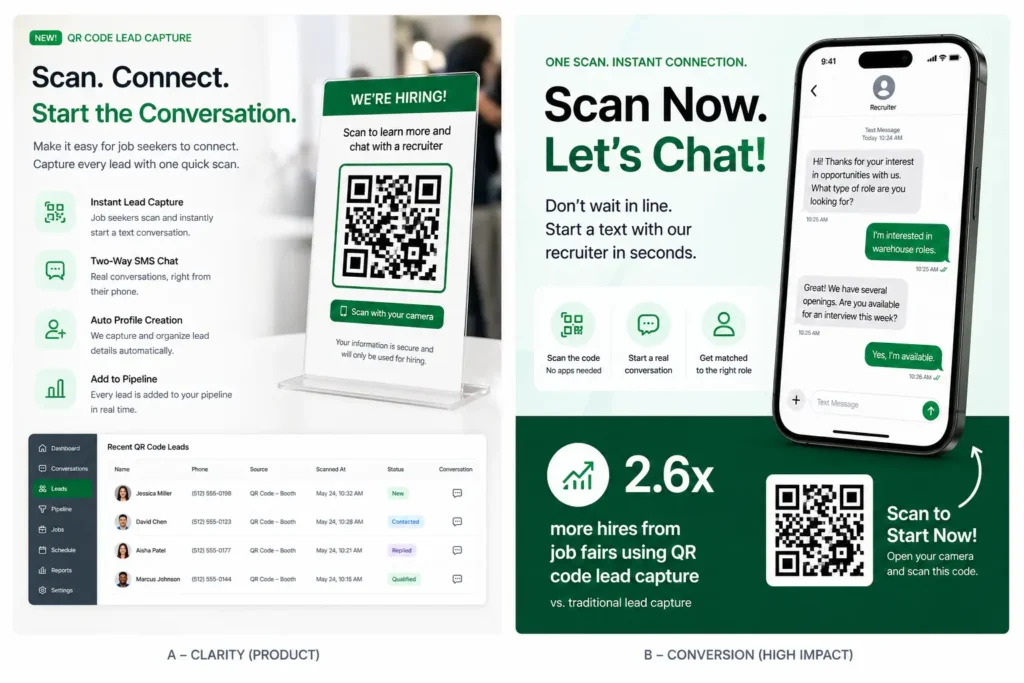
At the event itself, replace paper sign-up sheets with a keyword opt-in or QR code. Set up signage at your booth: “Text JOBS to [number] to apply now.” Candidates who text the keyword enter GoHire’s Apply by Text flow immediately — pre-screening questions, qualification check, and interview scheduling happen in the SMS thread while the candidate is still at the event.
For events with multiple open roles, use role-specific keywords: “Text WAREHOUSE to [number]” or “Text DRIVER to [number].” This routes candidates directly to the right pre-screening flow.
After the Event: Automated Follow-Up
The candidates you do not convert at the event are warm leads who showed up in person. A follow-up text within 24 hours captures the ones who were interested but did not complete the process on-site.
Example follow-up: “Hi [first_name], thanks for stopping by the [Company] booth at [Event]. We’d love to continue the conversation. Reply YES to schedule an interview, or reply INFO for open positions.”
Job Fair SMS Messaging Templates
These text recruiting templates are designed for each stage of the hiring event workflow. All use response triggers — the candidate replies with a keyword to advance.
Pre-Event Invitation: “Hi [first_name], [Company] is hiring! Join us at our Job Fair on [Date], [Time] at [Location]. Reply YES to pre-schedule your interview and skip the line. Reply STOP to opt out.”
Pre-Event Reminder (Day Before): “Reminder: [Company]’s Hiring Event is tomorrow, [Date] at [Location]. Reply YES to confirm your attendance. Walk-ins welcome too!”
At-Event Apply by Text: “Thanks for texting [KEYWORD]! Let’s get started. What is your full name? (Reply with your first and last name.)”
Post-Event Follow-Up (Same Day): “Hi [first_name], great meeting you at today’s event! We have openings that match your background. Reply YES to schedule an interview this week.”
Post-Event Second Touch (48 Hours): “Hi [first_name], just checking in from [Company]. We’re still scheduling interviews from [Event Name]. Interested? Reply YES and I’ll send some available times.”
Interview Scheduling via Text Invite: “Great! Here are available interview times: Reply 1 for [Date/Time], Reply 2 for [Date/Time], Reply 3 for [Date/Time].”
Text Messaging for Job Fairs vs Traditional Hiring Event Methods
The traditional job fair follow-up process has remained essentially unchanged for two decades: collect paper sign-up sheets at the booth, return to the office, manually enter candidate data, send batch emails, wait for responses, play phone tag to schedule interviews. This process takes five to ten business days from event to first interview — and by then, the most qualified candidates have already accepted other offers.
SMS transforms this timeline. With text messaging for job fairs, candidates enter your pipeline at the event itself. Pre-screening happens via automated chatbot while the candidate is still at the venue. Interview scheduling happens the same day via Text Invite.
Candidate capture: Traditional uses paper sign-up sheets with manual entry — data errors and illegible handwriting are common. SMS keyword opt-in or QR code creates a verified digital record with the candidate’s actual phone number instantly.
Follow-up speed: Traditional email follow-up begins one to three business days after the event. SMS follow-up can begin within minutes.
Candidate reach: Email follow-up reaches roughly 14% of candidates. SMS reaches 98%.
Scheduling efficiency: Phone-and-email scheduling requires an average of three to five exchanges per candidate. GoHire’s Text Invite schedules interviews with a single message exchange — the JW Marriott team scheduled 250 interviews in 24 hours using one hour of recruiter time.
Measuring ROI: Key Metrics for Job Fair SMS Programs
Keyword Opt-In Rate: The percentage of event attendees who text your keyword or scan your QR code. A strong rate is 30-50% of booth visitors.
Pre-Screening Completion Rate: GoHire’s Apply by Text typically sees 90% completion rates. If candidates drop off, simplify to three to five qualifying questions.
Interview Scheduling Rate: GoHire clients see 92% of qualified candidates self-schedule within 24 hours.
Show Rate: SMS confirmation and reminder messages significantly improve show rates — a text the morning of the interview reduces no-shows by reminding candidates and giving them an easy way to reschedule.
Cost Per Hire from Event: Compare total event cost against hires generated. SMS-driven events typically produce more hires per event because the automated pipeline converts a higher percentage of attendees into interviews and offers.
TCPA Compliance for Job Fair Text Outreach
Every job fair text outreach program must comply with TCPA and 10DLC registration requirements. When a candidate texts a keyword to your number, they initiate the conversation — creating consumer-requested contact under FCC guidelines. GoHire logs this keyword opt-in as the consent event, with timestamp and phone number.
- Consent before broadcast: Pre-event broadcast messages require prior consent. Only message candidates who previously opted in.
- Opt-out in every message: Include “Reply STOP to opt out” in your first message. GoHire handles STOP keyword processing automatically.
- 10DLC registration: Your job fair texting number must be registered for 10DLC. GoHire handles this registration as part of setup.
- Signage disclosure: Booth signage should include: “By texting [KEYWORD], you consent to receive recruiting messages from [Company]. Msg & data rates may apply. Reply STOP to opt out.”
See How GoHire Automates Your Hiring Events
GoHire customers fill roles in 24-48 hours instead of 7-14 days — with zero phone calls and zero emails. 92% of qualified candidates self-schedule their interview within 24 hours.
Frequently Asked Questions
How does text messaging for job fairs work?
Candidates text a keyword to a designated number or scan a QR code at your booth. This triggers an automated SMS conversation that collects their information, pre-screens them with qualifying questions, and offers interview scheduling — all within the text thread. Before the event, broadcast texts drive attendance. After the event, automated follow-ups convert warm leads into interviews.
What results can I expect from job fair SMS messaging?
GoHire clients see dramatic improvements over traditional methods. JW Marriott scheduled 250 interviews within 24 hours of a single text campaign, using one hour of recruiter time versus 80-120 hours. The 98% SMS open rate means nearly every candidate sees your message, compared to roughly 14% for email job alerts.
Do I need candidates’ permission to text them at a job fair?
When candidates text your keyword first, they are initiating the conversation — this creates consent under FCC guidelines. For pre-event broadcasts to existing contacts, you need prior consent. Always include opt-out instructions in your first message. GoHire handles consent logging and STOP keyword processing automatically.
Can I use hiring event text messages for multiple open roles?
Yes. Set up role-specific keywords (e.g., WAREHOUSE, DRIVER, CASHIER) that route candidates to different pre-screening flows. This ensures each candidate sees questions relevant to their role and that hiring managers receive qualified applicants for their specific openings.
Is text messaging for job fairs TCPA compliant?
Yes, when implemented correctly. Keyword opt-in at the event creates consumer-initiated contact. Pre-event broadcasts require prior consent. All messages must include opt-out instructions, and your number must be 10DLC registered. GoHire builds these compliance features into the platform.
